HiDream-O1-Image Local Install Guide
HiDream-O1-Image is an 8B open-source image foundation model from HiDream.ai. This page explains what can run locally, what is commercial-only, which hardware you need, and when it is a better Nano Banana local alternative.
Open Source vs Commercial HiDream
Open-source HiDream-O1-Image
This is the 8B MIT-licensed version you can self-host. It is the model covered by the install steps and repository links on this page.
- MIT license
- Open weights on Hugging Face
- Good route for local text-to-image research
- Requires a CUDA GPU for practical use
Commercial HiDream-O1-Image-1.5
This is a separate closed-source commercial route. It is cloud-only and should not be described as locally runnable.
- Closed-source commercial model
- Ranking and availability may change; verify them on the provider before purchase
- Available through online product routes such as vivago.ai
- Not a self-hosted local install target
Why HiDream-O1-Image Matters
Pixel-level UiT
The model is built as a natively unified Transformer over raw pixels, instead of stitching together a separate VAE and text encoder pipeline.
8B Open Weights
The official repository provides full and distilled Dev checkpoints under the MIT license.
Native 2K Output
HiDream targets high-resolution synthesis up to 2,048 × 2,048, which makes it useful for posters, scenes, and detailed compositions.
Visual Examples
These examples show the type of output categories users should evaluate before committing GPU time to a local setup.


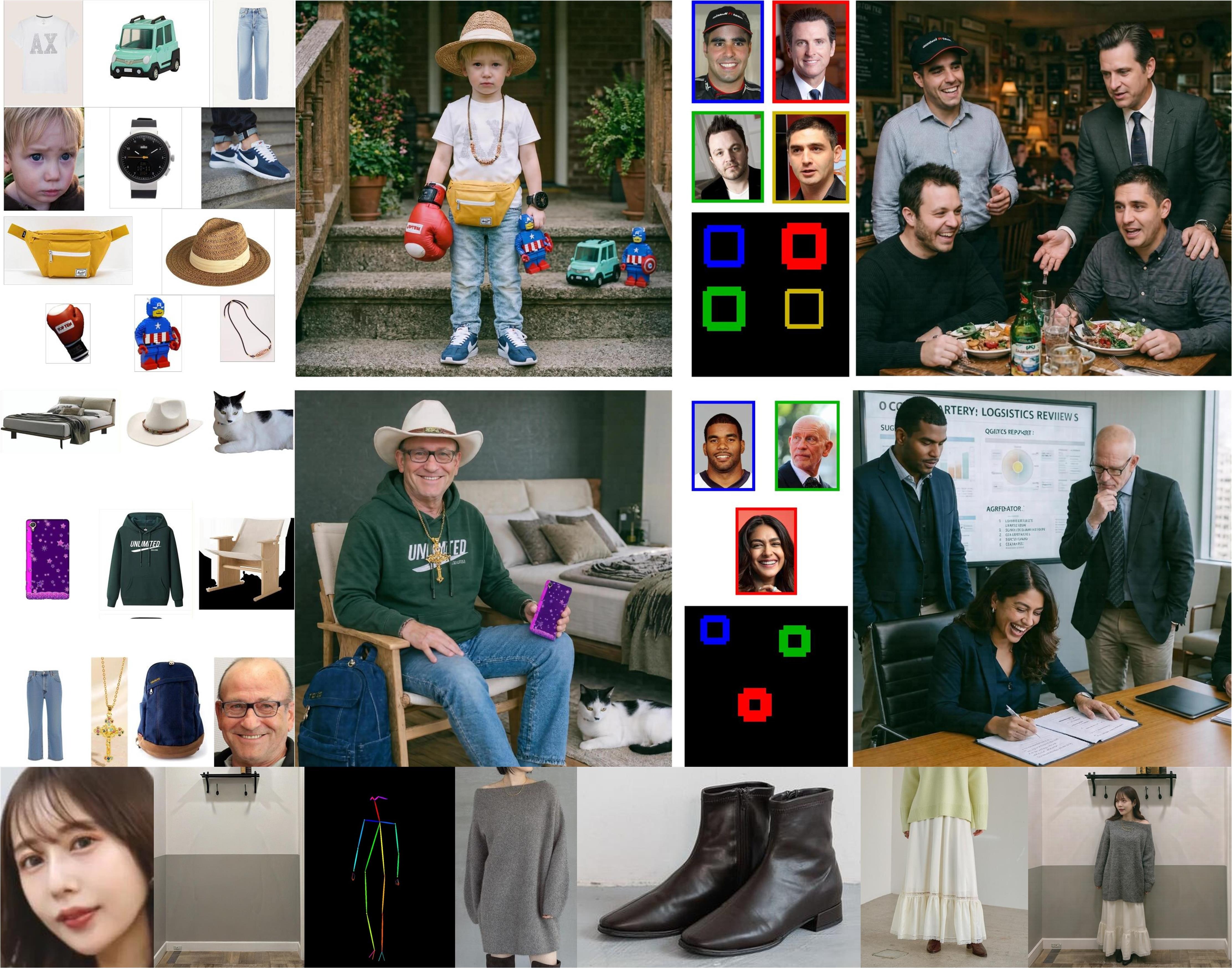
Local Install Path
Use the official repositories first. Treat this as the safe starting point before building your own app around the model.
| Step | What to Do | Why It Matters |
|---|---|---|
| 1 | Open the official Hugging Face model page and read the current requirements. | Model repos can change faster than blog posts, especially around memory optimization. |
| 2 | Prepare a CUDA machine and measure the exact checkpoint and resolution; the official repository does not publish one fixed minimum. | The model is open, but it is not lightweight like a normal desktop app. |
| 3 | Use the official GitHub examples before integrating custom prompts or serving APIs. | This reduces debugging noise and helps separate environment problems from prompt problems. |
| 4 | Only add the optional Prompt Agent after base generation works. | The Prompt Agent improves reasoning and layout planning, but adds extra runtime complexity. |
Minimal Setup Outline
This is a planning outline, not a replacement for the official README. Check the official repository before running commands.
git clone https://github.com/HiDream-ai/HiDream-O1-Image.git
cd HiDream-O1-Image

# Create an isolated Python environment, then install the repository requirements.
# Use the official README for the latest CUDA, torch, flash-attn, and model download notes.

python app.py
When to Choose HiDream Instead of Other Local Models
| Use Case | Better Route | Simple Reason |
|---|---|---|
| Open-source text-to-image exploration | HiDream-O1-Image | Strong open-weight T2I position with a modern unified architecture. |
| Heavy image editing and multi-image reasoning | HunyuanImage 3.0 | Better fit when the task is editing-focused and you have enough GPU memory. |
| Typography-heavy poster or UI images | Qwen-Image | Qwen remains a strong route for text rendering and structured layouts. |
| No GPU, simple automation | Nano Banana cloud client | The Python client can run on CPU because the image model runs in the cloud. |
FAQ
Is HiDream-O1-Image open source?
Yes, the 8B HiDream-O1-Image model is released as open weights under the MIT license. The commercial HiDream-O1-Image-1.5 model is different and should be treated as closed-source.
Can it run on a normal laptop?
Not realistically. The official implementation requires a CUDA-capable GPU, but it does not publish one universal minimum VRAM figure. Measure the exact full or Dev checkpoint, resolution, and attention setup before renting hardware.
Is this the same as Nano Banana?
No. Nano Banana refers to the Google/Gemini image route in this site. HiDream-O1-Image is listed as a local open-source alternative.